
What this issue means
CLS is about visual stability: the page should not jump around while users are reading, tapping or waiting for content.
Find why elements move unexpectedly during load and how to reserve stable space before users interact.
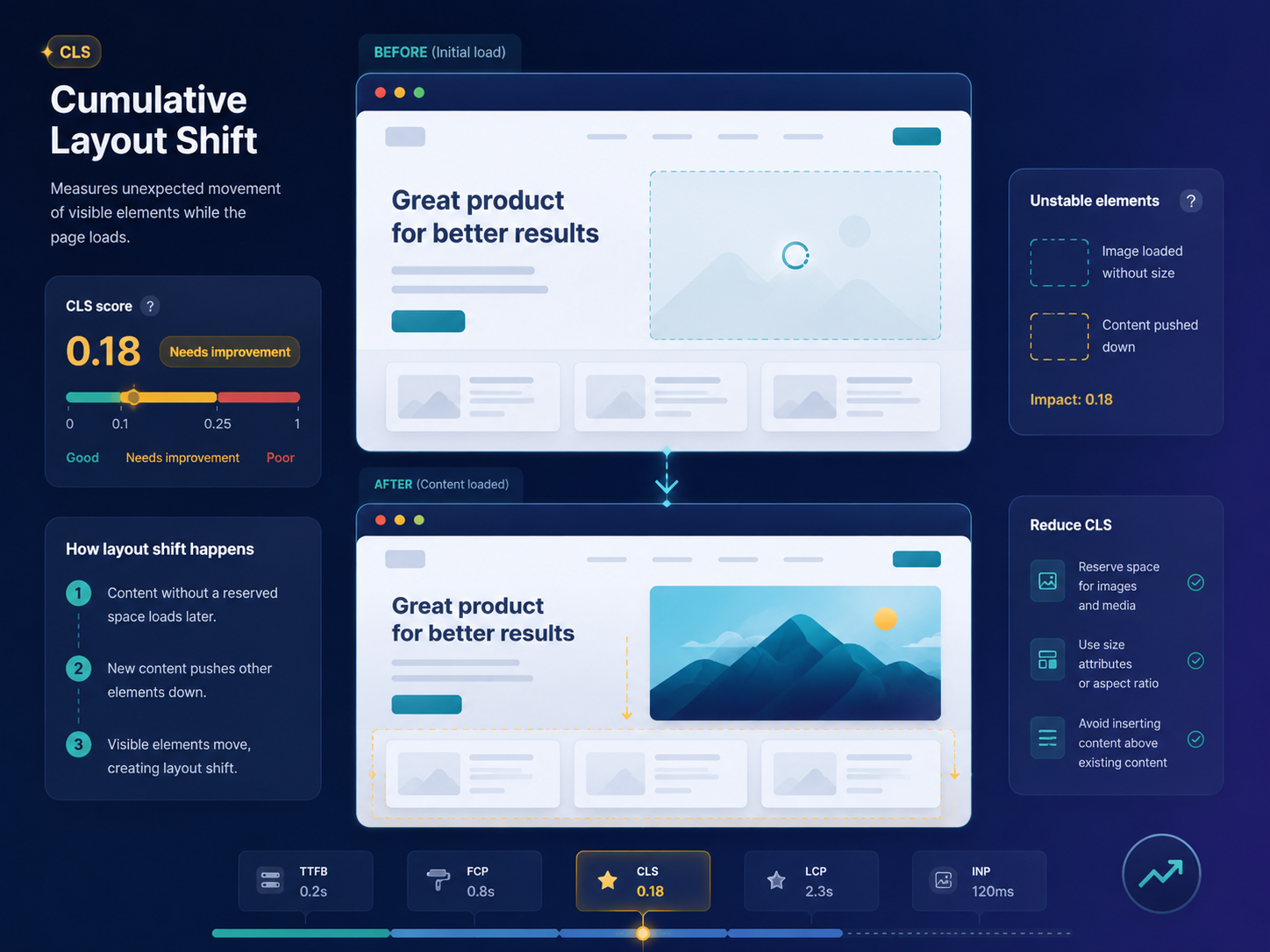
Short answer
Cumulative Layout Shift measures unexpected movement of visible content. Poor CLS is often caused by images without dimensions, ads or embeds without reserved space, late-loading fonts, banners or injected content above existing content. ViewMend helps you inspect the issue and connect it to practical layout fixes.
Why this matters
Layout shifts can cause misclicks and make a page feel unfinished. Fixing CLS is a user-experience improvement, not a guaranteed ranking shortcut.
CLS is about visual stability: the page should not jump around while users are reading, tapping or waiting for content.
Run a public page check, review the evidence, see whether the issue is prioritized, and use ViewMend AI only when you need an explanation, developer task or AI Fix Plan.
Run a new report and compare CLS, screenshots and layout-related findings. Also manually check common banner and consent states.
Common causes
What to check first
How to fix it
How to verify the fix
Run a new report and compare CLS, screenshots and layout-related findings. Also manually check common banner and consent states.
How it works
Product workflow
ViewMend helps you inspect a real public page, compare mobile and desktop evidence, and decide whether AI output is worth spending credits on.
Developer task example
Reserve fixed space for media, embeds and dynamic banners so visible content does not move unexpectedly during page load.
| Problem | CLS is about visual stability: the page should not jump around while users are reading, tapping or waiting for content. |
|---|---|
| Suggested fix | Reserve fixed space for media, embeds and dynamic banners so visible content does not move unexpectedly during page load. |
| Acceptance criteria | The next lab retest shows improvement for the affected metric, no critical mobile or desktop behavior is broken, and the page still renders correctly. |
| Retest step | Run a new report and compare CLS, screenshots and layout-related findings. Also manually check common banner and consent states. |
Fix priorities
| What to inspect | Why it matters | Next action |
|---|---|---|
| Media dimensions | Unreserved media space causes content to move when assets load. | Add width, height or aspect-ratio rules. |
| Injected banners | Late banners can push visible content down. | Reserve space or display overlays without moving the page. |
| Font swaps | Different fallback and web font metrics can shift text. | Use font-display carefully and choose metric-compatible fallbacks. |
FAQ
Common causes include missing media dimensions, late ads, embeds, banners, dynamic content and font swaps.
Reserve space for content before it loads and avoid inserting new elements above existing content.
Yes. Without dimensions or aspect ratio, the browser may not reserve the correct space.
Yes, especially if they push content after the page has started rendering.
Retest the page and compare CLS with screenshots or filmstrip evidence, then manually check dynamic states.