
What this issue means
The page may be waiting on fonts or swapping fonts in a way that changes layout after text appears.
Reduce text rendering delays and layout shifts caused by slow or excessive font loading.
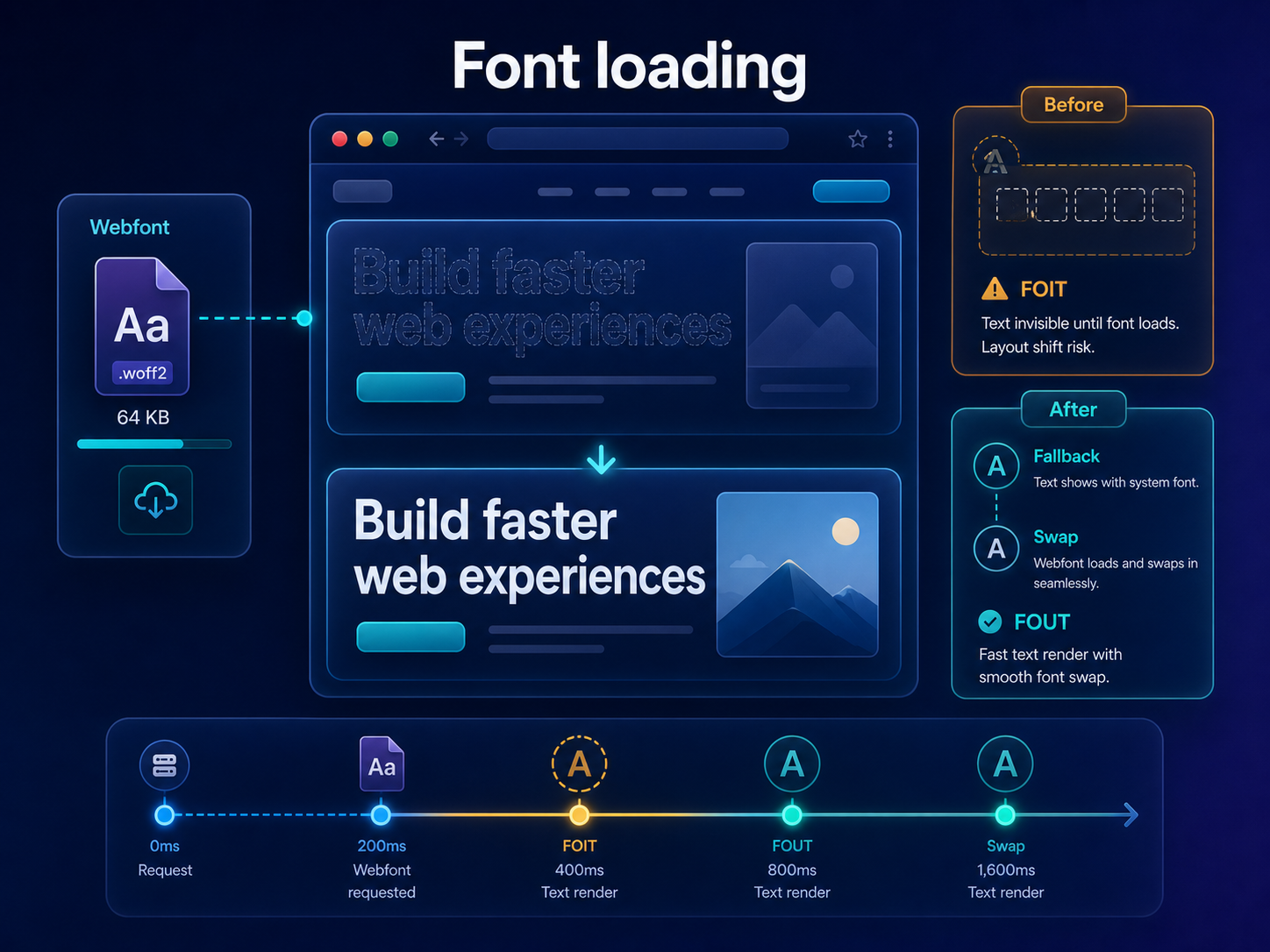
Short answer
Font loading can delay visible text or cause layout shifts when fallback fonts swap to web fonts. Too many weights, external font CSS and missing font-display rules can make the problem worse. ViewMend helps you see whether font behavior is related to LCP, CLS or render-blocking findings.
Why this matters
Fonts are part of brand design, but slow font delivery can harm perceived speed and visual stability.
The page may be waiting on fonts or swapping fonts in a way that changes layout after text appears.
Run a public page check, review the evidence, see whether the issue is prioritized, and use ViewMend AI only when you need an explanation, developer task or AI Fix Plan.
Run a new report and manually watch text rendering. Confirm the page still matches brand design after font changes.
Common causes
What to check first
How to fix it
How to verify the fix
Run a new report and manually watch text rendering. Confirm the page still matches brand design after font changes.
How it works
Product workflow
ViewMend helps you inspect a real public page, compare mobile and desktop evidence, and decide whether AI output is worth spending credits on.
Developer task example
Reduce font weights, set an intentional font-display strategy and preload only the critical font needed for above-the-fold text.
| Problem | The page may be waiting on fonts or swapping fonts in a way that changes layout after text appears. |
|---|---|
| Suggested fix | Reduce font weights, set an intentional font-display strategy and preload only the critical font needed for above-the-fold text. |
| Acceptance criteria | The next lab retest shows improvement for the affected metric, no critical mobile or desktop behavior is broken, and the page still renders correctly. |
| Retest step | Run a new report and manually watch text rendering. Confirm the page still matches brand design after font changes. |
Fix priorities
| What to inspect | Why it matters | Next action |
|---|---|---|
| Too many weights | Each weight can add file and render cost. | Keep only the weights the design really uses. |
| Font swap movement | Different metrics can shift text. | Choose compatible fallbacks and tune font-display. |
| Third-party font CSS | External requests can block or delay text. | Review preload, self-hosting and critical font strategy. |
FAQ
Yes. Fonts can delay text rendering and contribute to layout shifts.
It controls how text behaves while web fonts are loading.
No. Preload only fonts needed very early, otherwise preloads can compete with critical assets.
Yes, if fallback and final fonts have different dimensions.
Retest and manually review text rendering, CLS and visual quality.