
Category scores
Track Performance, Accessibility, Best Practices and SEO separately instead of hiding everything behind one vague health score.
Track the pages that should not quietly break after releases, content edits or script changes.
Monitor selected URLs for SEO, performance and technical changes after releases, content edits or script updates. Site Tracker shows what changed, which issues are new or recurring, and how each important page is moving over time.
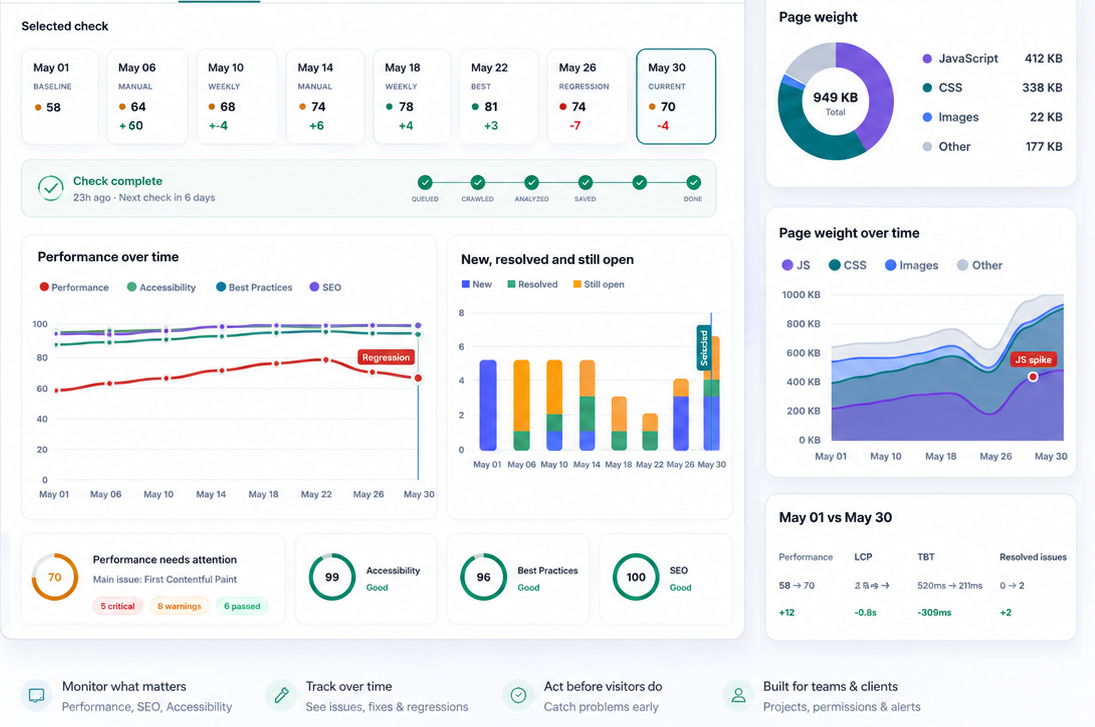
The tracker is not a generic crawler. It follows selected pages and keeps the signals that explain whether a page became better, worse or simply changed.
Track Performance, Accessibility, Best Practices and SEO separately instead of hiding everything behind one vague health score.
Follow LCP, CLS, TBT, page weight, requests and resource growth for the selected device.
Review critical, warning and passed signals with evidence, affected areas and practical context.
See first vs latest check, recurring issues, regressions, resolved problems and event streams over a selected period.
Inspect status code, canonical, noindex, headings, scripts, images and page resource composition.
Understand when each issue appeared, disappeared, returned or stayed open across checks.
Use repeated checks to spot the SEO and performance signals that often shift after templates, plugins, content workflows or deploys change a page.
Catch missing, duplicated or rewritten titles and descriptions before important pages drift away from their intended search snippet.
See when canonical URLs, noindex directives or status codes change on pages that should stay indexable.
Track H1 and heading changes that can happen when content blocks, CMS templates or page builders are edited.
Compare SEO category movement across checks instead of guessing whether a release improved or weakened a page.
Separate new issues from long-running problems so teams can focus on the changes that matter now.
Review new, resolved and recurring findings across the issue history matrix for every selected URL.
After a deployment, content update or script change, Site Tracker gives teams a focused way to verify the pages that matter most without running a full crawl every time.
Run a fresh check for landing pages, pricing pages, homepages or client URLs that should remain stable.
Review score movement, page weight, resources, metadata and issue lifecycle against earlier snapshots.
Focus on new regressions and recurring problems instead of rereading the same static audit report.
One-off checks are useful, but important pages keep changing. Site Tracker fills the gap between a single audit and basic uptime monitoring.
The strongest value appears after a page changes. Site Tracker turns repeated checks into a product story your team can act on.
Run a check after shipping code and compare it with the previous or baseline check to catch new JavaScript, heavier CSS or slower LCP.
Keep important URLs under review when editors, plugins or templates can change page metadata.
Agencies and freelancers can keep landing pages, campaign pages and client homepages in separate tracker groups.
The history view shows new, resolved, recurring and stable signals so a team can focus on what changed now.
The private tracker page is built around the questions teams ask after a check: what is weak, why did it happen, and what changed since the last snapshot?
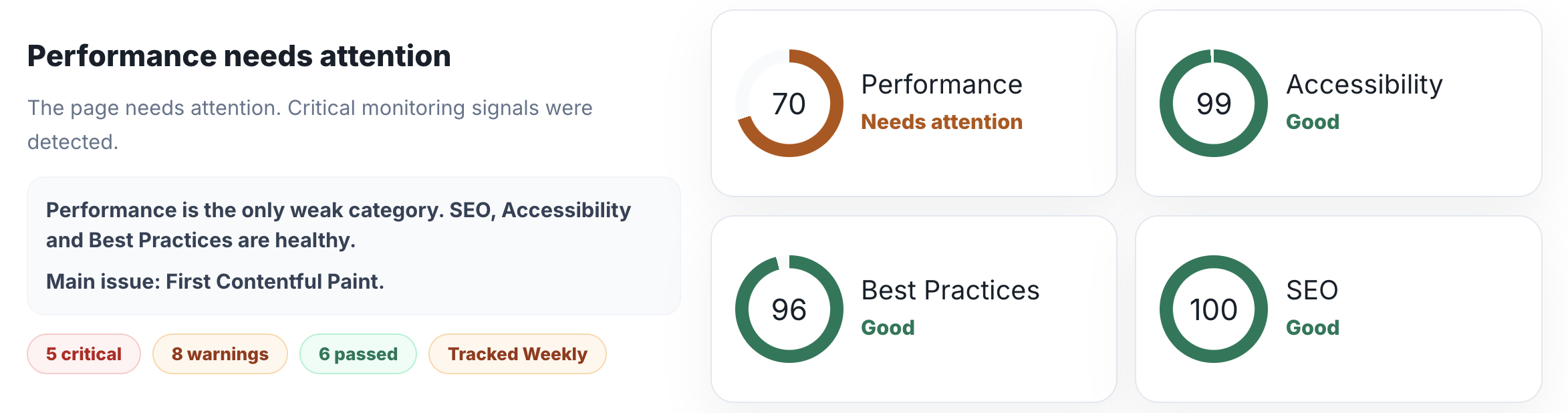
Performance can need attention while Accessibility, Best Practices and SEO remain healthy. The report keeps those categories visible instead of mixing them into one number.
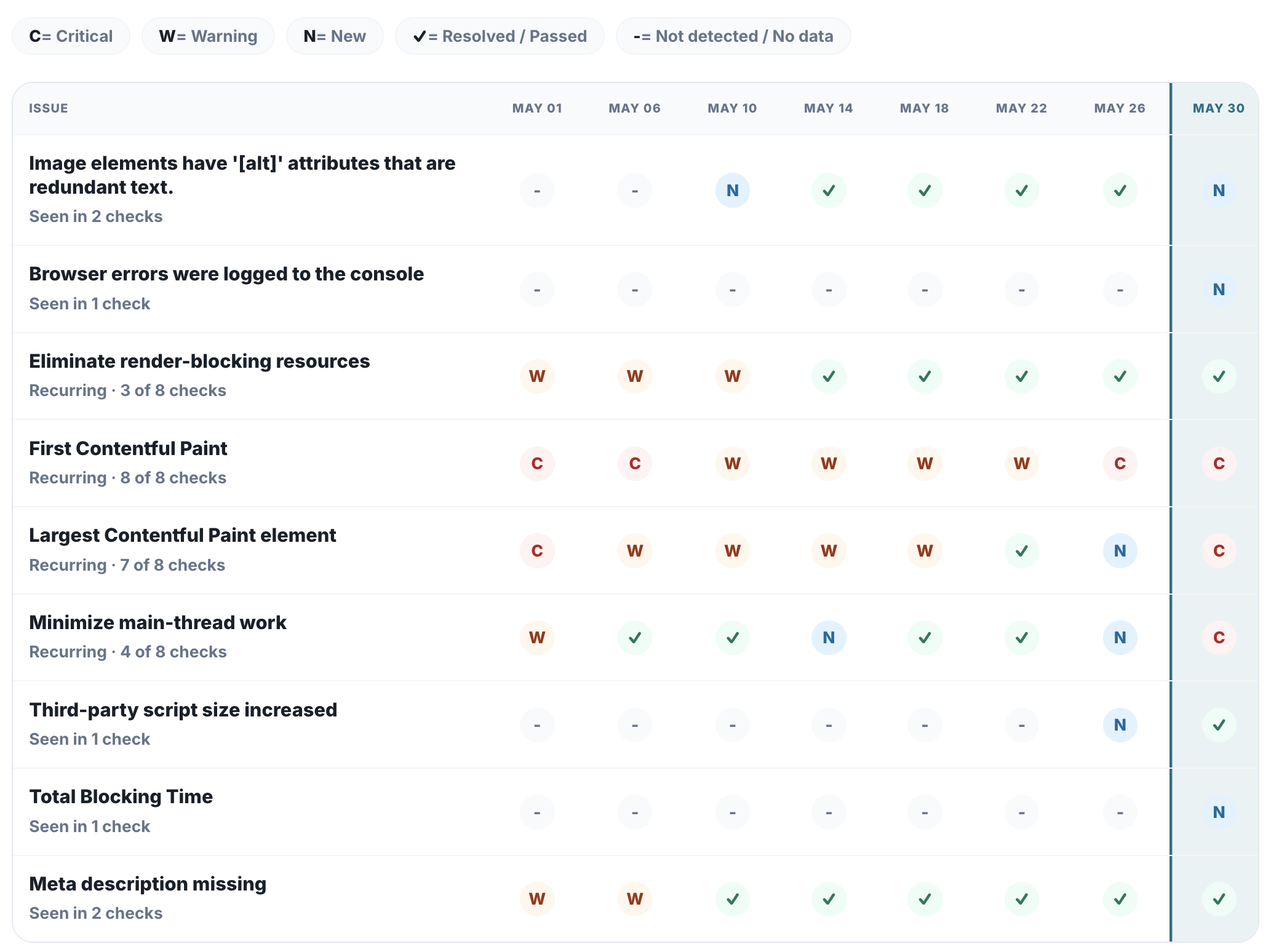
A static issue list cannot show whether a problem is new, recurring or fixed. The matrix maps each issue against each completed check.
The Change History page filters checks by date range, compares the first and latest completed check, highlights selected snapshots, and connects score movement with resource growth, issue lifecycle and important tracker events.
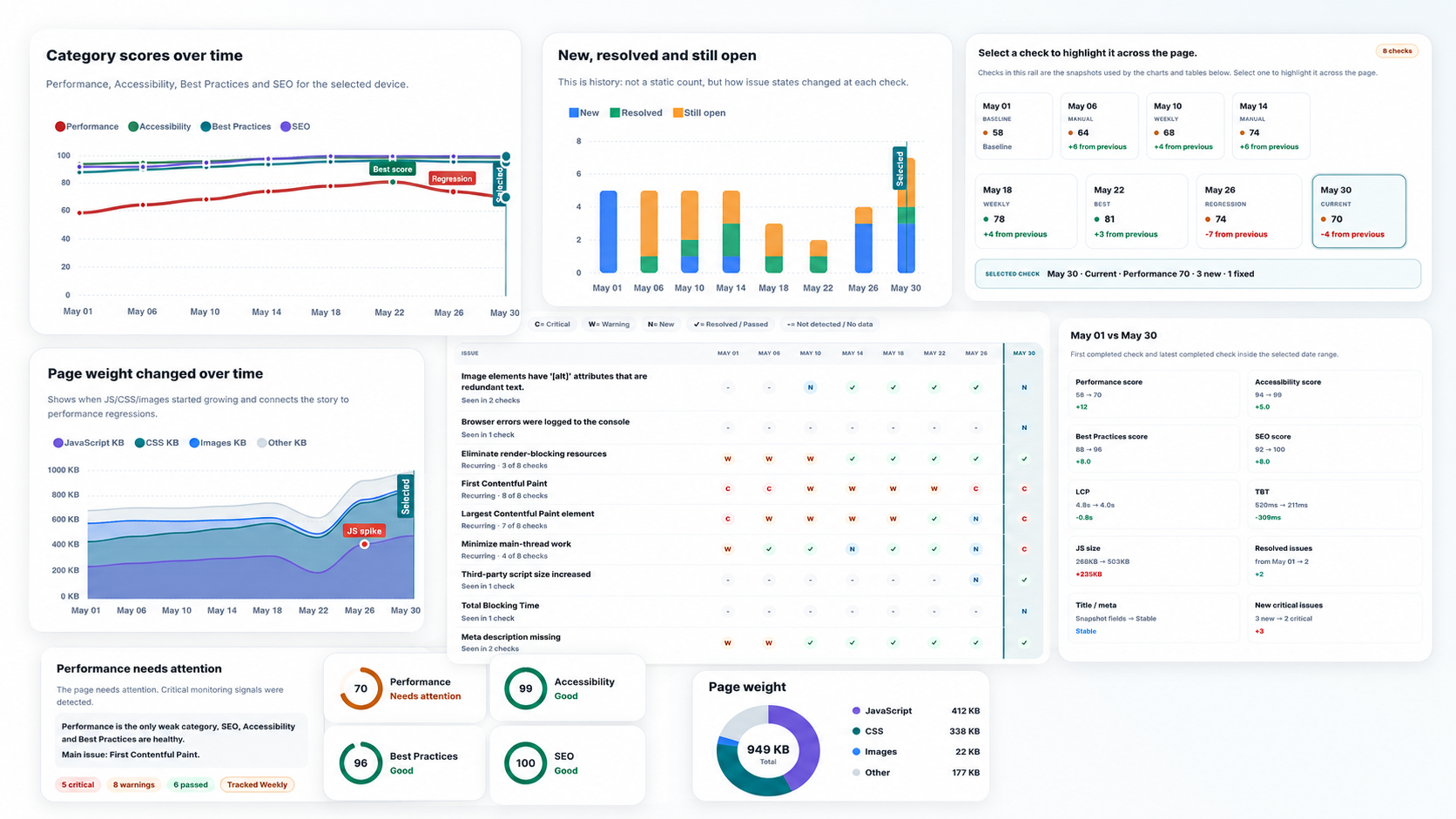
Site Tracker is designed for repeated checks, not a one-off audit.
Group URLs by website, project, client, release or campaign.
Track only the pages that matter instead of crawling the whole site.
Start a check manually after a change or let the selected frequency keep monitoring active pages.
Use category scores, signals, evidence and technical snapshots to understand the current state.
Compare checks, review recurring issues and confirm whether fixes stayed fixed.
Website change monitoring tracks important URLs over time so teams can see when SEO, performance, metadata, page weight, headings, indexability or technical issues change after releases and content edits.
A one-time audit shows the current state. Site Tracker keeps checking selected URLs, compares snapshots and highlights new, resolved and recurring issues so you can understand what changed later.
Yes. Site Tracker helps you watch title, meta description, canonical, noindex/indexability, headings, status code and SEO score movement across repeated checks.
Yes. You can run checks after a deployment, content edit or script change to compare important pages against previous snapshots and catch regressions early.
No. Uptime monitoring tells you whether a URL responds. Site Tracker focuses on the quality of the page itself, including SEO, performance, page weight, metadata and issue lifecycle.
No. It helps detect technical, SEO and performance regressions, but it does not guarantee rankings, traffic or revenue growth.
Start with a free ViewMend check, then use Site Tracker to keep selected URLs under control over time.